Showing posts with label ESGI. Show all posts

Saturday, March 11, 2017

Get Lucky with ESGI!


Are you feeling lucky? Because it's your lucky day!

I've written many times about the benefits of and my love for ESGI as an assessment tool that I use in my classroom.  Not only is it such a time saver and easy-to-use assessment tool that gives me TONS of information at my fingertips, graphed any way I could want, and easy to use and access wherever I am- WITHOUT fumbling through paper after paper-  but it also provides me with so many extras that just plain help me out in my daily teaching.  It's obvious that this program was created by a teacher who GETS IT. (Thank you, Greg Gorman!)  ESGI has really changed my life in the classroom. I posted ALL about the benefits, bells and whistles, and some examples of what ESGI offers HERE.

So many assessment tools were created by software engineers who understand software.  ESGI was created by a TEACHER who understands both software AND what educators want.  There is no comparison to any other assessment program.

If you are a teacher who does not yet use ESGI for our one on one assessments, ESGI is offering some exiting big deals from now until April 10th!

First,  if you sign up for a 60 day trial before April 10, ESGI will extend the trial so you have 5 months free instead of only the usual 60 days.  The trial will go through through August 31! Just use this special code to enter:  https://www.esgisoftware.com/sign-up/?promo=B1119

Also, you will be entered to win the Pot of Gold MYSTERY Prize which will be announced on April 11th!  None of us know what the mystery prize will be, but... knowing ESGI, it will be something awesome!

This special promo code also lets you take $40 off the price for the first year, so in the fall after this free promo, you will be paying $159 a year for the subscription.  If your district purchases the program for you, they can also receive the discount if they use the code!  If your team doesn't use ESGI yet, it's a great time for all of you to try it and see what you think.  The great part about an entire grade level using ESGI is that you can easily compare data for all students!  This is perfect for helping to determine RTI and AIS groups, and SO many other things- and it's impressive to show administrators all this organized, easy to read data.

This time of year, my favorite parts of ESGI are our sight word assessment and the ability to create flash cards for each student to reinforce the words they miss.  I keep a set of flashcards at school to use for RTI, and I send home a packet of words each week for students to practice at home.   It's so easy for me, because I just have to hit "print" and the professional looking flashcards are printed (with each child's name on top- so they don't even get mixed up!)
I can also print out a parent letter for each student which explains exactly what each child needs to work on at home.  

Our school doesn't send homework in kindergarten.  We send books to read each night, but not paper/pencil  homework.   I send the flashcards on Friday along with some games or ideas to do with the flashcards so it's fun for families.  For example, set a timer and see how many words the child can get in a set time.  Time the child to see how quickly he can read the cards, then, do this again and try to beat that time!  (They love contests!),  Keep piles of "yes" and "no" words.  See if the child can get all the words in the "yes" pile!  Hide the cards around the house and have the child find each card, then read them to you (or write them ) as she finds them.   Put one word on each stair and have the child read each stair as they climb to the top.   There are so many fun ways to play with flashcards!

My other favorite this time of  year is the name tag generator. The students are now working on first and last names, so I make several sets of names for practice. I use them for seating, but also for the children to make rainbow names, find sight words or chunks in their names, and as a matching game with pictures. 
(This is a sample of the first names on Table Name Plates.)

There are SO MANY other benefits EGSI offers.  We all need to show more and more data, it seems, and ESGI makes it so easy to do!  Not only easy- but useful!  Sometimes it seems we collect data for the sake of collecting data- but the information I collect on ESGI is what I use to guide my instruction with each individual student each day.

ESGI has a great explanatory video with all the details.  This Intro Webinar (17 minutes) is a very thorough explanation of the program.  

So now is the PERFECT time to give ESGI a try!  Don't wait another minute.  You'll have your class list set up in no time and be so anxious to start assessing.  I'm so excited for you to give it a try.  Here is that promo code again to enter you for the prizes and to get your discounts:  https://www.esgisoftware.com/sign-up/?promo=B1119

A quick review-  I asked some reliable teacher dogs to help me out with their opinions and here you go...

Go ahead... give it a try!  I know you'll love it.


Since we're on a lucky streak, each year I have my children tell me why they are lucky, so I can put their pictures over their lockers during March. They never fail to make me smile.


In my next life, I want to come back with his confidence:


Thank you for stopping by!

Sunday, January 1, 2017

New Year Odds and Ends!

Happy New Year!  I'm excited for a brand new year!

Image result for 365 new days 365 new chances
Here are some things I've been working on and wanted to share.

Here is my new bulletin board for back to school.  It seems like a Valentine's Day bulletin board, but actually, it's going to be our new theme for the new year.

I'm teaching my kids one of my favorite little poems:
Every time we do a Random Act of Kindness or any time one of the kids does something kind or loving, we're going to remember and say this poem.  I want them to always keep it in their hearts- and years from now remember it and remember learning it in kindergarten.  That would make me happy.


Next, I made a Winter Prezi that is free now at my TpT store.  I use it a lot in the winter for those extra minutes we have in class- and for a lot of teaching.  I added a section for Groundhog Day and Valentine's Day with videos, songs, and stories for each.  I keep adding to it every time I find a good video.

We always do a lot with snowflakes- from snowflake sight words to studying snowflakes for science. I included lots of links to interesting sites that teach all about snowflakes.  It is really fascinating- and the children love learning something different like that!
I used this Prezi all the time during snack before Christmas.  I put on carols for the children as they ate or worked quietly.  It was perfect.  I love the carols that play in the fireplace.  I made a fireplace background and added a YouTube video inside to make it look like a real fireplace.

HERE is a link to my post alllllllllllllll  about snow with lots and lots of ideas and freebies, in case you missed it!

___________________________________________________________________________________

I sort of enjoy January when we get back to school, because the rush from holiday to holiday is over. The beginning of the year goes so fast from Halloween-to Thanksgiving- to Christmas!  Plus, the beginning of kindergarten is busy with letters and sounds, letter formation, beginning writing, and classroom expectations.  By January, we settle in to some real learning.  

Our district uses Lucy Calkins for reading and writing.  We've been using the writing program for a while, but are just beginning the reading program this  year.   I just made a Super Reader Prezi (free) with the Reading Super Powers she talks about in her program.


This is part of my Beginning Reading Prezi that I use all the time.

I  don't know what I'd do with out my Reading and Writing Prezis during my teaching.  I don't have a lot of wall space for anchor charts, and after a while, the walls get so cluttered with "words" that I don't even think the children know where to look or what they are looking at!  I love to use my Smart TV as a wall chart space that I change to fit what I'm teaching.  I can show a quick video to reinforce a concept, or zoom in on one particular anchor chart and reteach those concepts,  then leave that chart up during our reading or writing time.   Here is a picture of what is on my Writing Prezi:

I keep adding to both Prezis as I find another great video or chart.  I just added more to my nonfiction section, because that's what we're working on when we go back in January.
___________________________________________________________________________________


Finally, I love to start the year with some quick assessments using ESGI.  I  wrote earlier about how I use ESGI in the beginning of the  year.  It's a great tool to help get to know the children and have data to guide your instruction and create resources to help students both at school and at home- all on my iPad, easy to access whenever and where ever I need it- and no paper mess!  (That's key for me!)

This time of year, my favorite parts of ESGI are our sight word assessment and the ability to create flash cards for each student to reinforce the words they miss.  I keep a set of flashcards at school to use for RTI, and I send home a packet of words each week for students to practice at home.   It's so easy for me, because I just have to hit "print" and the professional looking flashcards are printed (with each child's name on top- so they don't even get mixed up!)
I can also print out a parent letter for each student which explains exactly what each child needs to work on at home.  

Our school doesn't send homework in kindergarten.  We send books to read each night, but not paper/pencil  homework.   I send the flashcards on Friday along with some games or ideas to do with the flashcards so it's fun for families.  For example, set a timer and see how many words the child can get in a set time.  Time the child to see how quickly he can read the cards, then, do this again and try to beat that time!  (They love contests!),  Keep piles of "yes" and "no" words.  See if the child can get all the words in the "yes" pile!  Hide the cards around the house and have the child find each card, then read them to you (or write them ) as she finds them.   Put one word on each stair and have the child read each stair as they climb to the top.   There are so many fun ways to play with flashcards!

My other favorite this time of  year is the name tag generator. The students are now working on first and last names, so I make several sets of names for practice. I use them for seating, but also for the children to make rainbow names, find sight words or chunks in their names, and as a matching game with pictures. 
(This is a sample of the first names on Table Name Plates.)

There are SO MANY other benefits EGSI offers.  We all need to show more and more data, it seems, and ESGI makes it so easy to do!  Not only easy- but useful!  Sometimes it seems we collect data for the sake of collecting data- but the information I collect on ESGI is what I use to guide my instruction with each individual student each day.

ESGI has a great explanatory video with all the details.  This Intro Webinar (17 minutes) is a very thorough explanation of the program.  If you want to learn more about ESGI and to get a  free trial of the software, click here.

ESGI has really changed my life in the classroom. I posted ALL about the benefits, bells and whistles, and some examples of what ESGI offers HERE.  If you like using it and want to purchase the program, you can use my special PROMO CODE B1119 and receive $40 off your purchase for the first year. The price is usually $199 a year, but with the promo code, it will be $159 for the first year. Check with your administration because they may be able to purchase it for you. They can use the code and get it for $159 for the first year, too.  It's a great time of the year to try it out. 

It has made me actually enjoy assessments now, because I know I'm not going to be wasting time. It's quick and neat. The results and data are easy to see and use, and the materials for RTI are already made for me!

So- go ahead and give it a try FREE for 60 days,

I wish you all such a beautiful, healthy, happy year!  Thank you so much for stopping by!
Image result for 365 new days 365 new chances gif


Monday, August 1, 2016

Win Win with ESGI!

Welcome August!  I guess I need to embrace August and just beg it to go slowly.  There are still so many things I want to do, and August seems to fly by! 

I went into school over the weekend and put up the three bulletin boards that I do at the end of our primary wing.  The first one was inspired by I Wish You More, by Amy Krouse Rosenthal.  The other two were inspired by Pinterest ideas... :)  


I also entered all of my new class names into ESGI, so I am ready to go for this year!  If you haven't tried ESGI yet, now is the perfect time. 

Even Donald and Hillary know that ESGI is the only way to go- and you know that when they agree on something, it has to be great!

So... let's make assessing great again!

Not only can you get a FREE 60 day trial, but if you use the  PROMO CODE B1119 you can receive $40 off your purchase for the first year. The price is usually $199 a year, but with the promo code, it will be $159 for the first year. Many times your administration will purchase this for you, too, if you ask. They can also get the discount for each subscription they purchase.

AND if you sign up NOW, ESGI will enter you in a raffle to win one of ten $50 gift certificates to TpT! SO- try it free for 60 days, and when you love it, ask your school if they will purchase it for you.  Even if they can't, it is well worth every single penny for the sanity it saves you! 


Pre-Kindergarten - 1st Grade Classroom Tools

ESGI is so amazing throughout the entire year because it addresses our many assessment needs that arise at different times during  the year. Here's a quick post to show you how I use ESGI to start my year.

Before using ESGI, I assessed each student's letter ID and sounds on a paper sort of like this-  I had papers and "data" everywhere.  The trouble was, I was always rifling through papers to try to find what I needed (and by the time I found it, the child probably knew 5 more letters!)


I am not a techy person.  I actually think I tend to avoid much technology because I think it's simpler not to use it sometimes.  So for ME to say that I don't ever want to assess without using ESGI on my iPad ever again, says a lot.  It says that ESGI makes it SO EASY and SO QUICK.  And then gives SO MUCH assistance to teachers to help with students' areas of weakness.

ESGI has every sort of assessment you could want available to easily choose from and add to your assessments- OR you can create your  own.  For example, if your sight word list is a little different than those available, you can simply make your own with our words.  I made many assessments- so you know it's easy to do!

I can quickly call up my students one at a time, and get to spend a little one on one time "playing" with them on the iPad, while I see what they know!

Here's a sample of a number recognition assessment.  See how clear and easy it is to see and score?  You just hit the Y or N at the bottom.  The children don't even know you are assessing them.
                             
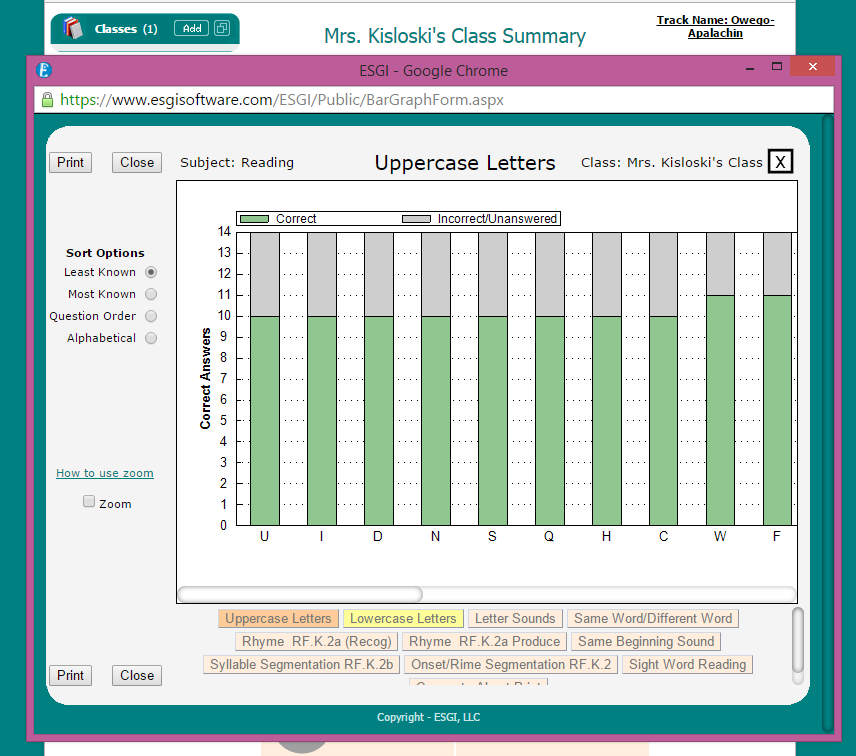
For all of the beginning year assessing we teachers do, ESGI is great- because all of our data is stored and organized for us right online.  Not only organized, but graphed and really useful for so many things as I start the year... grouping and RTI right off the bat!


I  print out flash cards for the letters each individual student missed, to use for RTI  and to send home with each student. Later on in the year, we move to sight words.  I use the sight word flash cards a LOT with my kids, too.
 ESGI  creates parent letters,  so parents knew exactly what skills need to be practiced at home.

I don't send any parent notes home this time because it's the beginning of the year, and the kids pick up letters quickly when we get going. I just wanted to show you what they would look like.   I do send home parent notes after we work on letters for a while,  if a student is stuck on certain letters.

You can also edit the letter to parents.

AND- I did not have one  stack of papers to flip through- not even one sheet of paper.  It was all right on my iPad.

Another favorite part of ESGI to start the year is the Class Management tools.  I can print pages for name tracing, cubby names, table name plates, class lists... you name it! What a time saver this time of year!  I have several students who just plain need name writing practice.  I can print out name pages for those students to practice with one click!  So easy.

 
As the year goes on, there are more and more benefits of ESGI.  If you want to learn more about ESGI and to get a free 60 day trial of the software, click here and try it out for yourself!  It's so easy to show your administrator the benefits of ESGI so they may purchase it for your grade level, too. Many schools are  encouraged to use more and more technology, and ESGI is perfect for that.

ESGI has a great explanatory video with all the details.  This Intro Webinar (17 minutes) is a very thorough explanation of the program. Once I watched these videos, I was all set to go.

Our RTI Team was just discussing how we needed better data collection and a more clear picture about the students coming to our RTI Team.  It doesn't get more clear than this!

If a district uses this program, every student can be entered.  The data and progress can be saved from year to year.  Groups can be created, so that only those in that group are compared.

I posted ALL about the benefits, bells and whistles,  and some examples of what ESGI offers HERE.  If you like using it and want to purchase the program, you can use my special PROMO CODE B1119 and receive $40 off your purchase for the first year. The price is usually $199 a year, but with the promo code, it will be $159 for the first year. Check with your administration because they may be able to purchase it for you. They can use the code and get it for $159 for the first year, too.  It's a great time of the year to try it out. 

It has made me actually enjoy assessments now, because I know I'm not going to be wasting time. It's quick and neat. The results are easy to see and the materials for RTI are already made for me!

So- go ahead and give it a try FREE for 60 days, and be entered to win one of the ten $50 gift cards from TpT! You will be so glad you did.


Pre-Kindergarten - 1st Grade Classroom Tools
Thanks for stopping by!


Search This Blog